Inventory Control: supply inventory software for hospitals and health systems
Every bin counted. Every lot traced.
Medical and non-medical supplies, in every room of every facility, counted by scan instead of by walk-round. PAR levels you set, replenishment the system drafts, and a person who approves it.
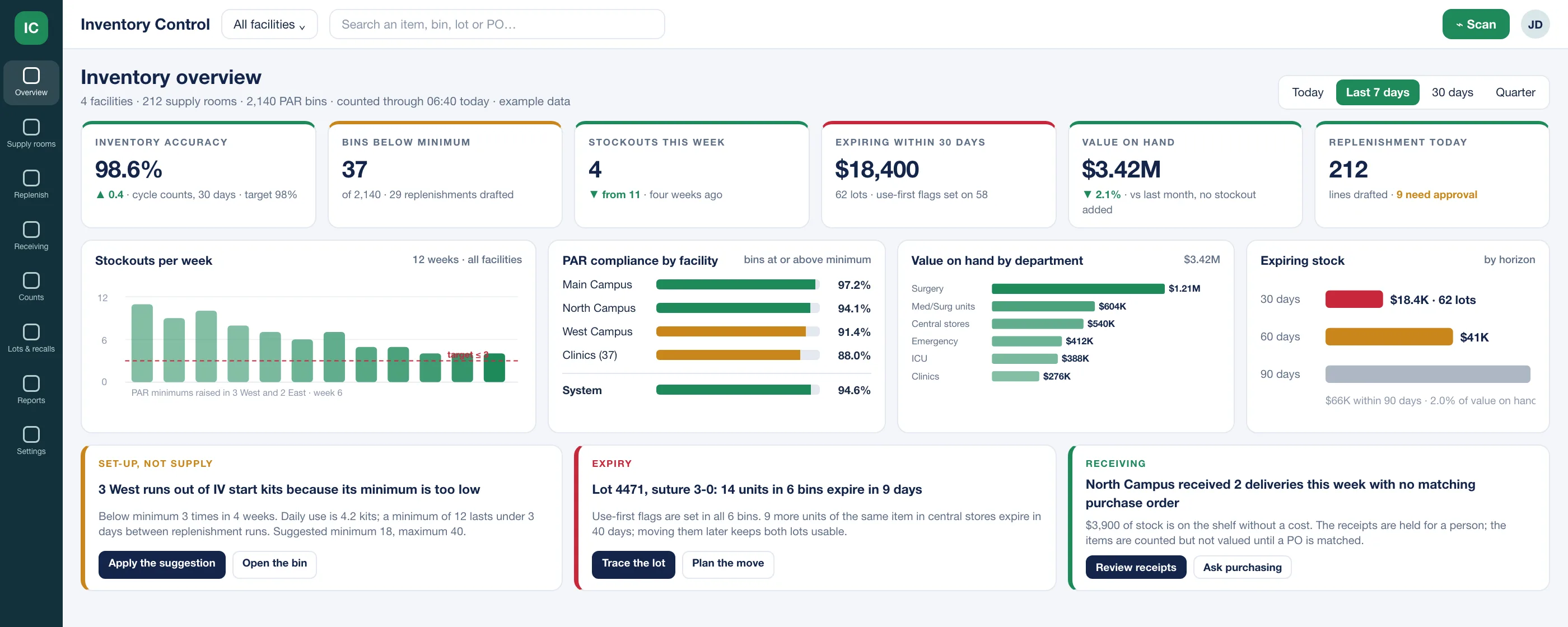
This is the overview for a health system of four facilities on one morning: accuracy, the bins that are short, what expires next, and three insight cards that say what to change.
Three checks on every bin, before anyone orders
The questions a supply chain manager asks on a walk-round, asked by the system every time something is scanned.
Stock
Is the bin where it should be?
On hand against the PAR you set for that bin: minimum, maximum, and the pace it is used at. Below minimum drafts a replenishment; above maximum drafts a transfer to a room that needs it.
Trace
Which lot is on the shelf, and until when?
Lot, serial and expiry on every unit from receiving to use. Expiring stock is flagged use-first, and a recall names every room, bin and case it reached in minutes, not a weekend.
Replenish
Did the order match what the count said?
Replenishment is drafted from the count, priced from your contract, and sent to your ERP as a requisition once a person approves. Exceptions, not every line, are what people look at.
The questions a supply chain director asks, on one screen each
Where is the system short, over, or expiring?
Accuracy from the cycle counts, bins below minimum, stockouts by week, what expires in 30, 60 and 90 days, and value on hand by department, across every facility. The insight cards under them name a cause and propose the fix: a minimum that is too low, a lot to use first, a receipt with no purchase order.
- 1Accuracy from cycle counts, against the target you set.
- 2Stockouts by week, with the change that moved them written on the chart.
- 3An insight names the cause and proposes the fix; a person applies it.
Which bins need a person this morning?
One supply room after its count: every bin against its minimum and maximum, days of supply from the last four weeks of use, and the three that need a person. The replenishment draft beside it was priced from the contract the minute the count finished; approving it sends the requisition to your ERP.
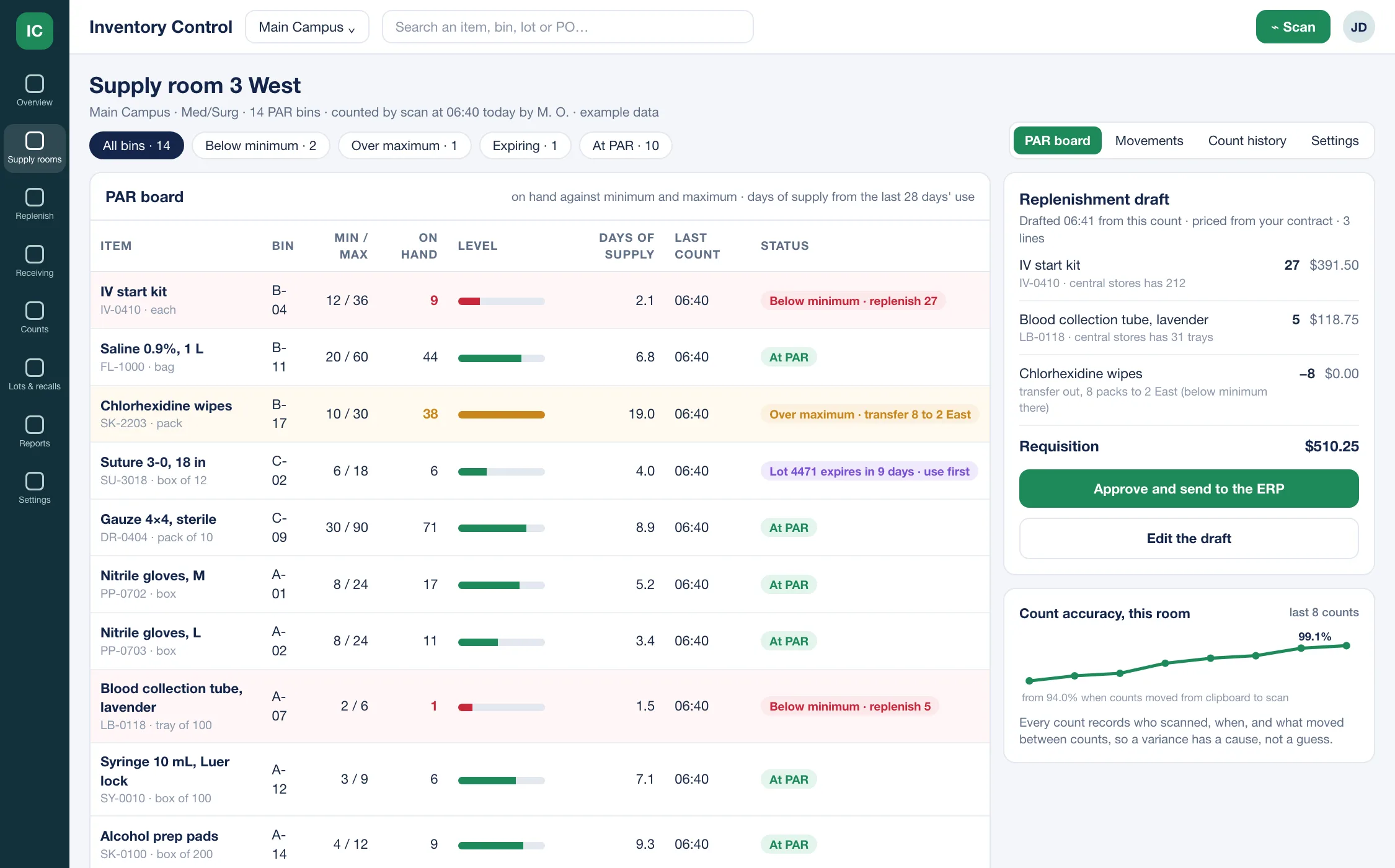
- 1Below minimum: the replenishment quantity is on the line.
- 2Drafted from the count, priced from your contract, sent to your ERP once approved.
Where is this lot, and what happens in a recall?
One lot from the loading dock to the shelf: when it was received and against which purchase order, which bins it was put in, which cases used it, and how many units remain where. A recall hold quarantines the units, tells the people who hold them and lists the cases, and starts only when a person presses the button.
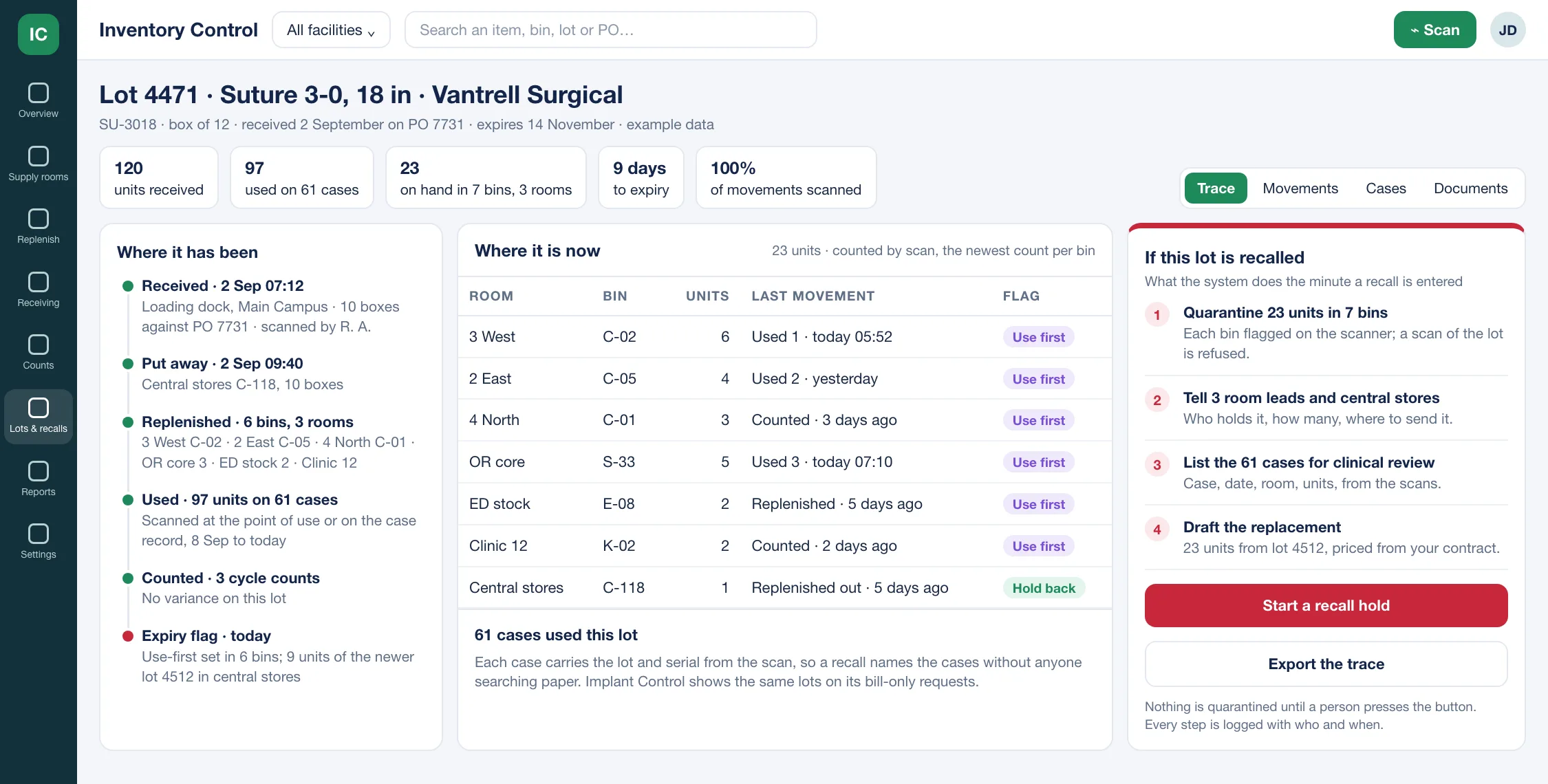
- 1On hand by bin and room, from the newest scan, not a walk-round.
- 2A recall quarantines, notifies and lists the cases; nothing moves until a person presses the button.
How a supply room runs, round the loop
Six stops, every day. Each one is a scan on a phone, not a form, and each one moves the on-hand figure the moment it lands.
Received
scanned against the PO, lot and expiry captured
Put away
scan the bin; the item knows its home
Used
scanned at the point of use or on the case
Counted
cycle counts by bin, by value and risk
Replenished
drafted from the count, a person approves
Reported
accuracy, stockouts, expiry, value on hand
Implants are inventory too. Here is where each one lives.
Implant Control follows the implant from the case to the purchase order. Inventory Control follows every supply, implant or not, from the loading dock to the shelf. They share the item master and the lot and serial record, so an implant is counted once.
Implant Control keeps
Inventory, as far as the implant goes
- Lot and serial on every request line, matched to the surgical case.
- Wasted, trial and explanted items marked on the request, so they never become stock.
- Every change kept: who changed what on a request, with before and after values.
- The requisition to your ERP and the purchase order number back.
Inventory Control adds
The whole supply chain, every room
- Every bin in every facility, medical and non-medical, with a PAR minimum and maximum.
- Scanning on a phone for receiving, put-away, transfers, use and cycle counts.
- Replenishment drafted from the count and sent to your ERP as a requisition once a person approves.
- A lot traced from the loading dock to the case, and a recall that names every bin and case it reached.
A hospital that runs Implant Control already has the item master, the lot and serial record and the ERP file exchange that Inventory Control needs, so the second product starts from the first.
Who works in it
- Supply chain and materials management
Set the PAR for every bin, see the whole system on one page, and work the exceptions: bins short, bins over, lots expiring, receipts with no purchase order.
- Central stores and receiving
Receive against the purchase order by scan, put away by scan, and fill the replenishment drafts the rooms produce, with the lot and expiry captured once at the dock.
- Nursing and unit managers
A supply room that is counted before the shift starts, with the short bins already on a draft, so nobody walks the aisle with a clipboard or runs out mid-morning.
- Finance
Value on hand by room, department and facility; expiring stock as a figure, not a surprise; and a requisition that was priced from the contract before it reached the ERP.
- IT and integration
Item master in and requisitions out by scheduled file exchange or the ERP’s own interface, single sign-on through your identity provider, and interfaces built to be swapped when the ERP changes.
Questions buyers ask
Straight answers, including the ones that say no.
Does it replace our ERP?
No. Your ERP keeps the item master of record, the purchase orders and the invoices. Inventory Control sends it requisitions and takes back purchase order numbers and receipts, by scheduled secure file exchange or through the ERP’s own interface where it has one. The interfaces are built to be swapped, so a change of ERP is a change of file layout, not a new system.
Do we need RFID, or new hardware?
No. A barcode scanned on a phone, or on the scanners you already own, covers every transaction: receiving, put-away, transfers, use and counts. Where a cabinet or an RFID reader already exists, its reads come in through integration and show on the same bins.
How do the PAR levels get set, and who changes them?
You set a minimum and maximum for each bin, on the screen or from a file. From then on the system watches use against them and, when a bin keeps running short or sits over its maximum, proposes a new level with the arithmetic beside it. A person applies the change; nothing moves on its own.
What happens in a recall?
Enter the lot, and the trace shows every bin that holds it, every case that used it and every movement in between. Starting the hold quarantines the units in each bin, flags the lot on the scanners, tells the people who hold it, lists the cases for clinical review and drafts the replacement. Each step is logged with who and when, and none of it starts until a person presses the button.
How does it fit with Implant Control?
Implant Control follows an implant from the surgical case to the purchase order and keeps the lot and serial on each request line. Inventory Control counts every supply room, implants included, and drafts the replenishment. They share the item master and the lot record, so an implant is counted once and traced once.
What does it not do?
It is not a pharmacy medication system, a capital asset register or a biomedical equipment maintenance tool. It does not write purchase orders or match invoices; your ERP does both. If one of those is essential for you, tell us and we will tell you plainly whether it fits.
See it on one of your supply rooms
Bring one room's PAR list and a month of its issues. In a working session we load the bins, run a count against your figures and hand you the replenishment draft the count produces.