Rebate Recovery: AI contract reading for hospital supplier agreements
Read by the assistant. Approved by a person.
Upload a signed agreement and the assistant proposes the whole contract as a draft, each value with the page and the words it came from. A person checks the evidence and presses Create. Then the arithmetic takes over, and the AI steps out.
The page on this screen is one agreement as the assistant reads it: every value with its evidence, the one it could not find boxed in red, and the read-back underneath. Supplier, rates and dates are invented.
Rebate agreement, schedule B
Volume tiers and payment terms
| Tier | Annual purchases | Rebate |
|---|---|---|
| 1 | Up to $1,500,000 | 2.0% |
| 2 | $1,500,001 to $3,000,000reached in Q2 on $2.1M of purchases | 3.5% |
| 3 | Over $3,000,000 | 5.0% |
- Rebates are paid quarterly, within 45 days of the period end.Found word for word, page 4
- Buyer maintains 65% market share of the category.Close match, page 7: written as “sixty-five percent (65%) of annual category spend”
- Tier 3 rate.No quote found. Creation is blocked until a named person confirms the rate
Read-back3.5% on every purchase once annual spend passes $1,500,000, retroactive to the first dollar, paid quarterly within 45 days of each quarter end.
What it reads, and what it turns away
The hard part of a rebate agreement is reading it. The assistant does that part and hands the result to a person as a draft.
The signed agreement, page by page
Upload the PDF. The assistant reads every page, typed or scanned, and proposes the contract as an editable draft: programs, rebate terms and their tiers, commitments, facilities, products it finds listed, dates, caps, payment type and frequency, and the pay periods that follow from them.
It asks what it has been given
Before extracting anything, the assistant classifies the document. An amendment, an excerpt, a price file or a proposal is turned away with the reason, so a draft is never built on half an agreement.
Your master lists, not its memory
The supplier and the facilities are matched against your own supplier and facility lists and confirmed by you. The assistant proposes a match; it does not invent a supplier.
A draft, never a live contract
What comes out is inactive until a named person reviews it and presses Create. Nothing is calculated, and no alert is raised, on a contract nobody has approved.
Every value carries its evidence
Each value the assistant proposes is marked by whether its wording was found on a cited page: word for word, a close match that a person settles, or not found at all.
A rate or a dollar amount with no quote behind it blocks creation until a named person confirms it. That is the rule that keeps a guess out of the arithmetic: a figure the document does not support never reaches a calculation on its own.
The three marks are the same on every draft, so a reviewer learns them once. The review we recommend ends with a back-test against a period you were already paid for.
- Found word for wordTier 2 rate3.5% of net purchasesQuoted from the agreement, page 12, and matched exactly.
- Close matchMeasurement periodCalendar quarterPage 4 says “each quarter of the Agreement Year”. A person confirms which quarters.
- Not foundAnnual cap$250,000No sentence in the document supports this figure. Creation is blocked until a named person confirms it.
Illustrative clause and figures. The draft is always inactive until a person presses Create.
The obligations it understands
A rebate agreement is a set of promises with conditions attached. The assistant proposes the ones below as terms, tiers and commitments the engine can hold as written.
- Tier ladders
- Retrospective or stepped, with the floor of the first tier, the open top tier and the rate at each step.
- Measurement period and payment terms
- Calendar or agreement-year periods, the rebate frequency, the days after period end and the payment method.
- Market share commitments
- The committed share, what counts in the numerator and the denominator, and the rebate that depends on it.
- Growth over a baseline
- The baseline year or figure and the growth the rebate requires.
- Gates and conditions
- A rebate that is paid only when a commitment is met, with the commitment named.
- Caps, admin fees and prompt pay
- Annual caps, administrative fees deducted from a rebate, and prompt-pay terms.
- Scope
- Which facilities, which products or product families, and the contract dates.
What the assistant does not find, you add in the guided wizard. The draft is the starting point, not the limit: the engine holds every shape below as written.
Every contract shape the engine holds
- Tiered spend and volume rebates: flat, retrospective to the first dollar, or stepped
- Percent, per-unit and fixed-amount rates
- Growth over a baseline: prior year, prior period or a fixed figure
- Year-to-date cumulative tiers with the retroactive uplift paid automatically
- Market share ladders, on share of spend or share of units
- Per-product rate tables
- Prompt-pay discounts, invoice by invoice
- GPO and distributor admin fees, accrued from your purchases and checked against the statement
- Distributor sales tracing programs
- Annual true-up against a second ladder, with no clawback
- Caps, floors and carry-forward
- Per-facility terms that do not aggregate
- Per-procedure rebates from surgical usage
- Outcome programs, where a person records the qualifying event
- Commitments that gate a rebate: any two of three, either-or targets, ratchets by agreement year
- Pro-ration of targets for partial periods
Then every term reads itself back
Once a term is in the draft it writes itself out as one sentence: the rate, the threshold, whether it is retroactive, the period, the payment terms. The check is one sentence against one clause, not a screen of fields against a spreadsheet.
When the engine runs, every result carries its own sentence too, including every $0. A rebate that reads zero names the rule that emptied it, so the first conversation after a load is about one rule, not about trust.
An illustrative read-back: 3.5% on every purchase once annual spend passes $1,500,000, retroactive to the first dollar, paid quarterly within 45 days of each quarter end.
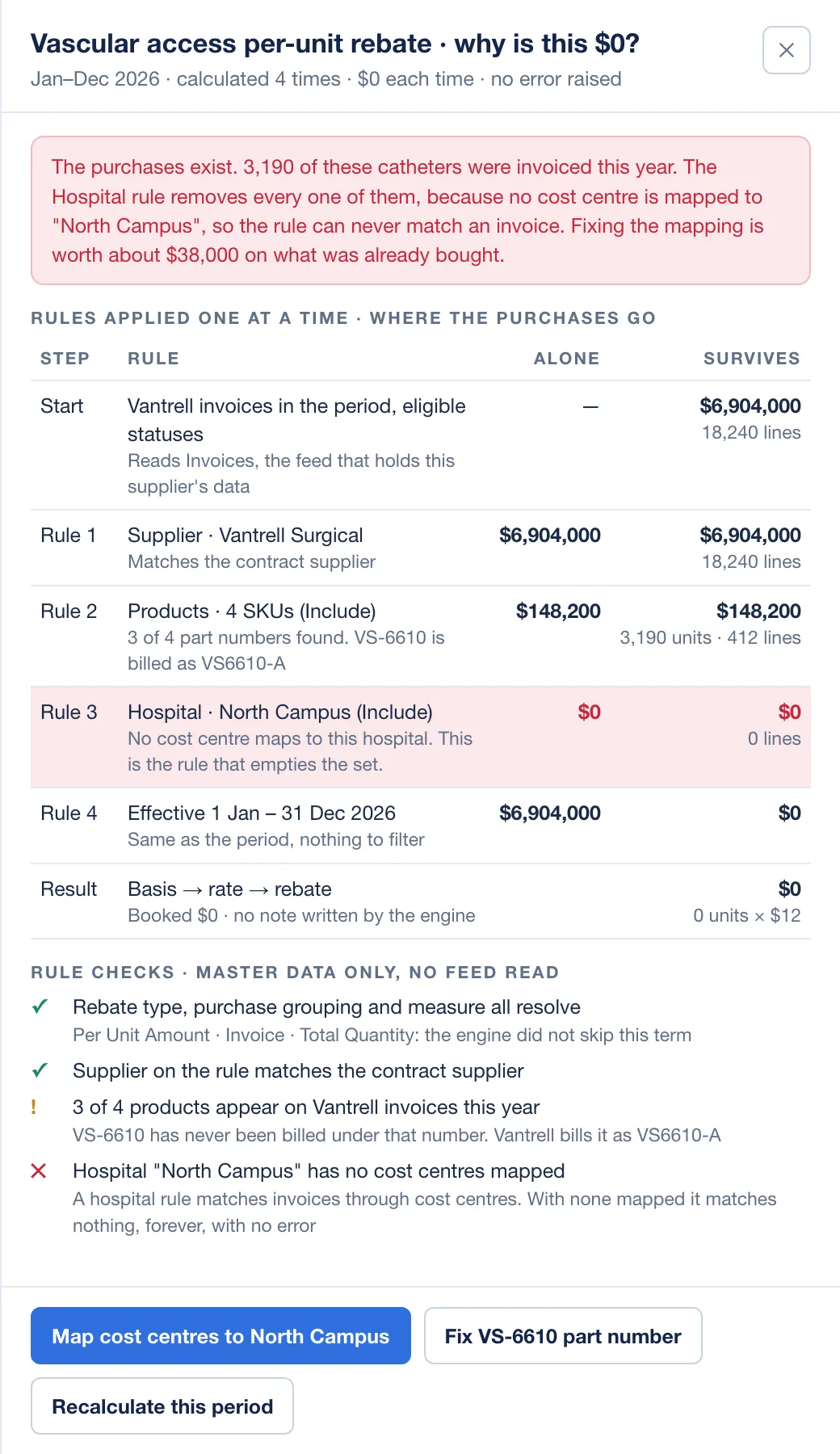
Ask it a question about your numbers
A second assistant answers questions inside the product. It is built to be boring in the right ways.
Every figure comes from a query, not the model
The assistant asks the system for the number and reports what came back. It does not estimate, round or recall a figure from an earlier answer.
It answers from the rulebook
Every rule Rebate Recovery applies is written down with a worked example, and the assistant looks the rule up before it explains a result. An answer about why a number is what it is cites the rule.
Read-only, logged, anonymised
It can change nothing. Every exchange is logged with who asked, what was asked, the answer and when. It sees stand-ins for supplier and contract names.
What it never does
The limits are the design, and they are the first thing an IT reviewer asks about.
Create an active contract
Every draft is inactive until a named person presses Create. A value with no evidence blocks creation until that person confirms it.
Calculate, alert or decide
Rebates, compliance, alerts and dashboards are rules and arithmetic on your own purchase data. None of it is AI, and none of it is a prediction.
Change a number
The assistant that answers questions is read-only. It cannot edit a contract, a period or a payment.
Send anything
No email, no claim to a supplier, no message leaves the product on its own. People send the statements it produces.
See your suppliers by name
The questions assistant works on stand-ins for supplier and contract names. Model requests go to Amazon Bedrock inside AWS, in its United States routing, and are not used to train any model.
Appear in Implant Control
AI features exist only in Rebate Recovery. Implant Control has none.
How the AI features handle data, on the security pageThe contract intake checklist
Bring one signed agreement
In a working session we load it in front of you, walk the evidence marks, and read every term back. You leave knowing exactly what the assistant found, what it could not, and what a person had to decide.