Every rebate, held as written. Checked against every purchase.
Supplier rebate tracking, management and recovery software, built in healthcare. Every agreement held as written, checked against what you bought, and turned into a short list: money to collect, and money still to win. Built for hospitals, and nothing in it is hospital-specific: the same engine runs for any organisation that buys under supplier rebate agreements.
This is how the assistant reads an agreement: every value with its evidence, and the one it could not find boxed in red. How the contract assistant works
Rebate agreement, schedule B
Volume tiers and payment terms
| Tier | Annual purchases | Rebate |
|---|---|---|
| 1 | Up to $1,500,000 | 2.0% |
| 2 | $1,500,001 to $3,000,000reached in Q2 on $2.1M of purchases | 3.5% |
| 3 | Over $3,000,000 | 5.0% |
- Rebates are paid quarterly, within 45 days of the period end.Found word for word, page 4
- Buyer maintains 65% market share of the category.Close match, page 7: written as “sixty-five percent (65%) of annual category spend”
- Tier 3 rate.No quote found. Creation is blocked until a named person confirms the rate
Read-back3.5% on every purchase once annual spend passes $1,500,000, retroactive to the first dollar, paid quarterly within 45 days of each quarter end.
One contract year, round the loop
Six stops, period after period. The agreement is read once; everything after that runs on your own purchase files and explains itself as it goes.
The agreement is read
AI proposes, a person approves
Purchase files load
invoices, POs, receipts, tracing
The engine runs
tiers, shares, commitments
The statement
earned, received, owed, by reason
Alerts, ranked by money
overdue, short, still in reach
Payment reconciled
remittance checked, split, booked
Three figures, never added together
A single “total at stake” is how rebate reports mislead. Money that is owed, money that is pacing and money that is possible need different work, so they stay apart.
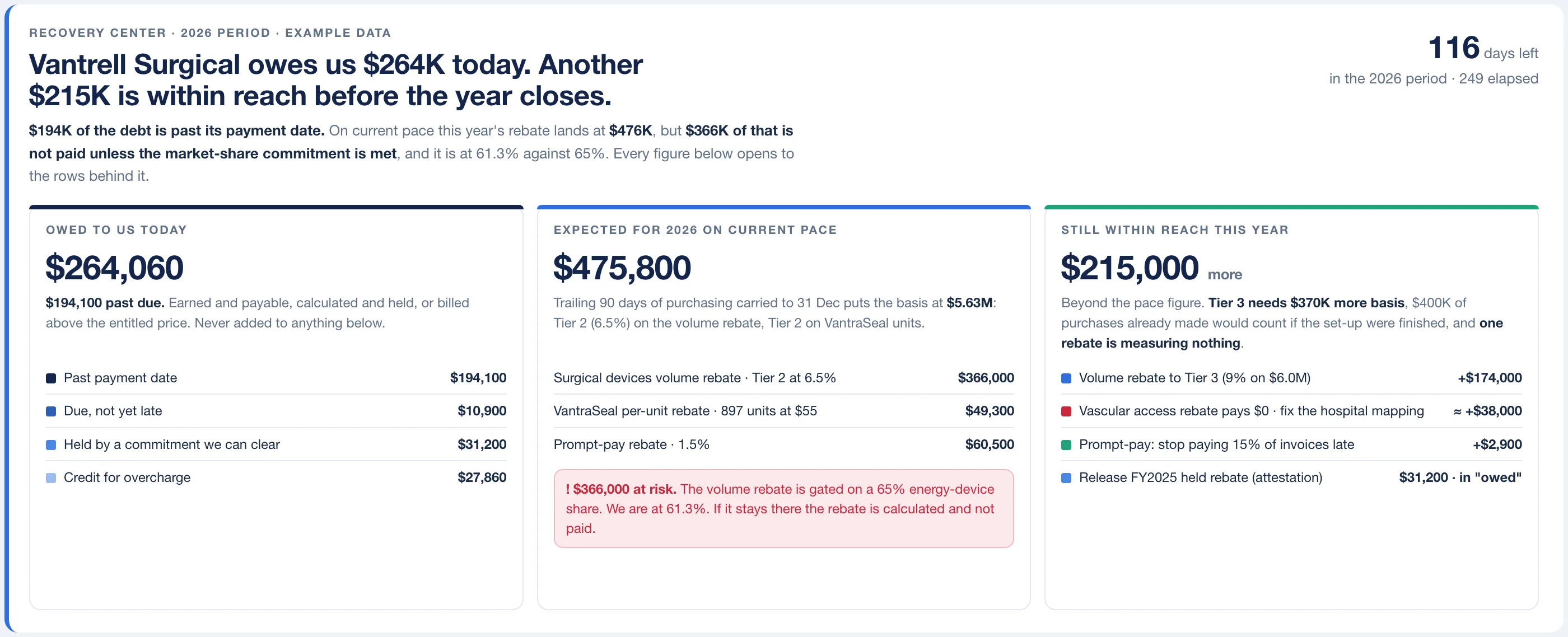
- 1Owed today, split by the reason each dollar is owed: past due, due, held, overcharged.
- 2The part of this year’s pace that is not paid unless the share commitment is met.
- 3What the next tier is worth, and the purchases it would take to reach it.
- Owed to you today
- Earned and past its payment date, due but not yet late, held by a commitment you can still clear, or billed above the price you were entitled to. Split by reason, because each is collected differently.
- Expected this period, on current pace
- Where the purchasing pace so far lands you by period end, rebate by rebate, with the part at risk behind an unmet commitment called out. Pace arithmetic, labelled as such, not a prediction.
- Still open before the period closes
- What the next band is worth and how much more purchasing it takes, where that volume can come from, and which rebates are paying nothing because the set-up is unfinished.
It starts with the contract as written
Upload the signed agreement. The contract assistant reads it page by page and proposes the tiers, commitments, facilities, dates and caps as a draft, each value with the page and the words it came from. A value with no evidence blocks creation until a named person confirms it.
Then every term reads itself back in one sentence, so the check is one sentence against one clause.
- Found word for wordTier 2 rate3.5% of net purchasesQuoted from the agreement, page 12, and matched exactly.
- Close matchMeasurement periodCalendar quarterPage 4 says “each quarter of the Agreement Year”. A person confirms which quarters.
- Not foundAnnual cap$250,000No sentence in the document supports this figure. Creation is blocked until a named person confirms it.
Illustrative clause and figures. The draft is always inactive until a person presses Create.
The questions a CFO asks, on one screen each
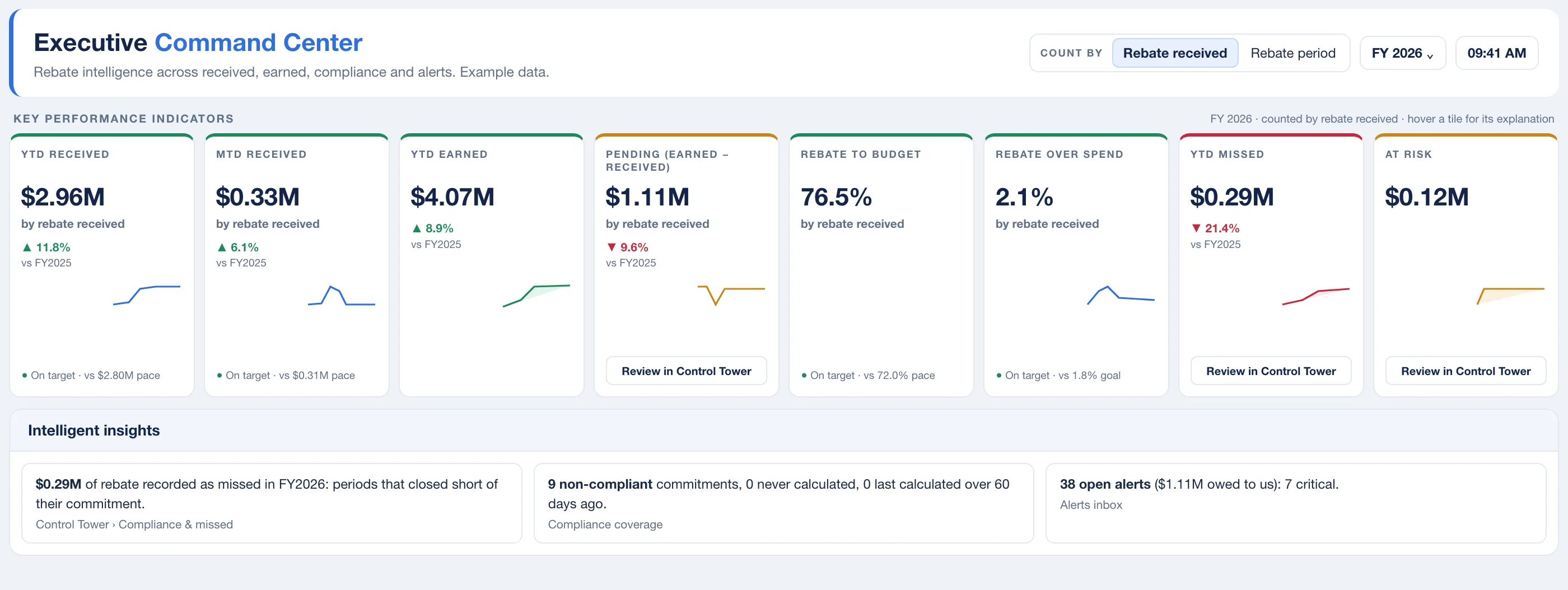
How is the rebate year going?
Received, earned and pending for the year, rebate against budget, what was missed and what is at risk, each with its trend against last year. Every tile opens to its definition, its formula and the source it reads, and a source that fails shows blank with a banner rather than a confident zero.
Which dollars need work first?
A scheduled rules pass raises 29 kinds of alert, from an overdue payment to a market share measuring no market. Every actionable dollar lands in a lane by the kind of work it needs, and the queue is ranked by money. Findings are grouped by cause, because one cause has one remedy.
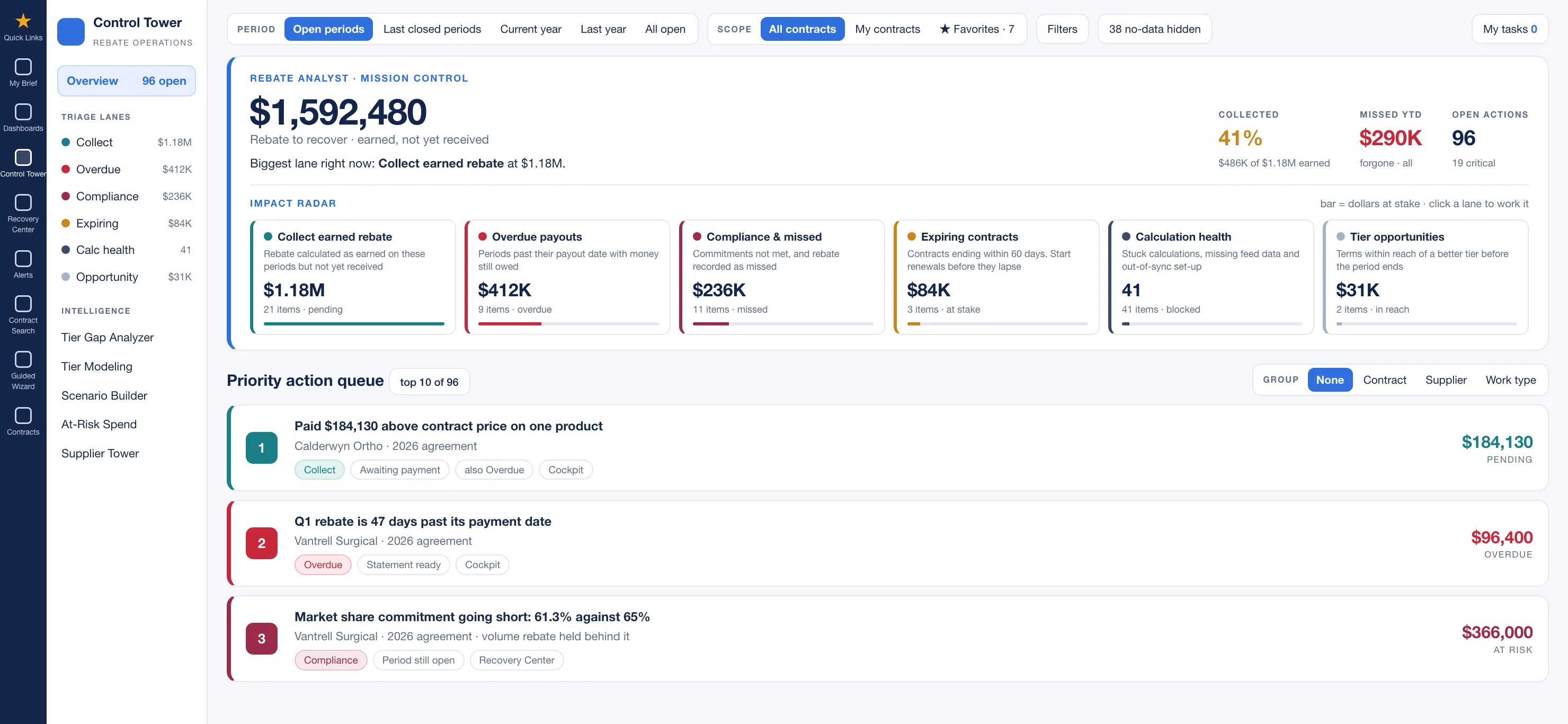
- 1Every actionable dollar in a lane by the kind of work it needs: collect, chase, comply, renew, fix.
- 2The queue, ranked by money, with the reason and the contract on each line.
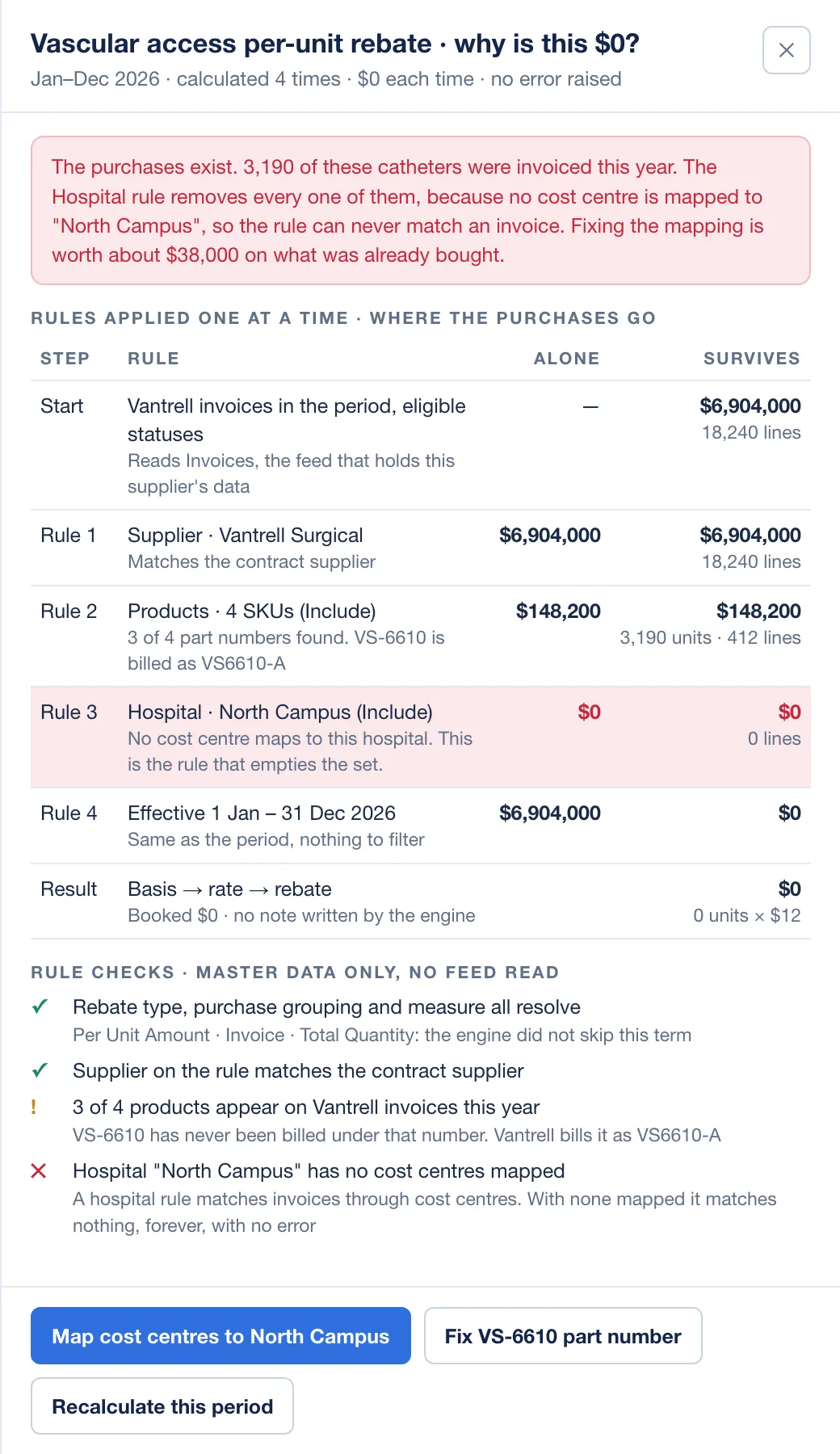
Why does this rebate read $0?
The most expensive rebate problem is silent: a product tag no item carries, a hospital with no cost center mapped to it, a unit ladder counting a box of twenty as one. So every result explains itself, including every zero: ask why, and each rule is applied in turn until you see the one that empties it. A visible zero is fixable; money booked on a guess is found by the supplier.
Are we meeting the market share commitment?
A share measured only against the supplier’s own products reads 100% forever; scoped one level too wide, an 85% commitment can never pass. Each commitment states its own market, the same definition is applied to both halves of the fraction, and two alerts stand guard: one for an empty market, one for a market far too wide.

How a rollout goes
Start with a handful of contracts that matter. The first useful statement does not wait for the whole portfolio.
Load your purchase data
Invoices, purchase orders, receipts, distributor sales tracing, surgical usage, item and supplier masters, as files. Each one is validated first, with a verdict in words.
Bring in the contracts
Upload the signed PDF and review the draft the contract assistant proposes, or build the contract in the guided wizard. Every term reads itself back in one sentence before a named person approves.
Let the engine run, then work the lanes
Each rebate and period books as earned, lost or still open, with a written reason. Then fix what makes a number untrustworthy, chase what is overdue, and reach the tiers still open.
Reconcile what arrives
Record each supplier payment, accept or adjust the proposed split across periods, and send a statement with invoice-level evidence where the remittance disagrees.
Who works in it
- Contract and rebate analysts
Start the day with a short list ranked by dollars. Reconcile payments, produce supplier statements, and answer “why is this zero” without querying a database.
- Sourcing and contracting leaders
See a commitment going short while it can still be fixed, and what the rebate hanging on it is worth.
- Finance and accounting
Earned, received and pending by contract, supplier, company, cost center and hospital, exported for month end and tied to the same results every other screen shows.
- Supply chain executives
The rebate year on one page: how the portfolio is pacing against budget, what was missed, what is at risk, with every tile explaining its own formula.
Questions buyers ask
Straight answers, including the ones that are “no”.
Is it only for hospitals?
No. Rebate Recovery was built for hospitals and health systems, and nothing in it is specific to them. It reads a supplier agreement, loads your purchase files, and checks tiers, growth over a baseline, share commitments and administrative fees against what you bought. A distributor, a manufacturer, a retailer or a member of a purchasing group can run the same contract through it, with the same files. Implant Control, the other product, is for hospitals and surgery centers.
How does our purchase data get in? Do we need an ERP integration?
No integration project. Data arrives as files: CSV or Excel uploads through the data loader, or a scheduled secure file drop from your ERP. Fourteen file types are supported, and every file is validated before it loads. The product does not connect to your ERP in real time, and it does not need to.
What does the AI do, and what does it not do?
It reads a signed agreement into a draft contract, and it answers questions about your numbers. Every value it extracts shows whether the wording was found word for word on a cited page, was a close match, or was not found. A rate or amount with no quote behind it blocks creation until a named person confirms it. The result is always an inactive draft. The assistant that answers questions is read-only, takes every figure from a system query rather than from the model, and every exchange is logged. Alerts and calculations are rules and arithmetic, not AI.
Does it forecast our rebates?
It shows where current pace lands by period end and what a change in purchasing would do to tier and share together. That is arithmetic on your own data, and the screen says so. It does not predict.
How current are the numbers?
Screens show the last calculation run and say when that was. Rollups refresh about every fifteen minutes in business hours, alert detection runs on a schedule, and anyone with access can recalculate a contract on demand.
Does it chase suppliers or file claims for us?
No. It produces the evidence: a statement to the supplier by reason and period, invoice-level exports for overcharges, and a rule-by-rule interpretation of each term. Your team sends them. Alerts appear in the product, not by email.
We use GPO contracts, local contracts and distributor agreements. Does it handle all three?
Yes. Contracts carry their source, reports split received rebate by GPO, local and distributor agreements, and admin fees are accrued from your own purchases and compared with the statement you are sent.
Does every user see every screen?
Access is by role, and users can be limited to specific hospitals or suppliers. The newest workspaces, the recovery page and the alert lanes, are released to administrators first and widened as they settle. Ask us which are generally available when you talk to us.
We already had a recovery audit. Do we still need this?
They look at different years. An audit looks back at closed years; this checks the open period while a missed tier can still be reached. The two can work together: an audit for the years before go-live, software from then on.
We already use an exchange or price-sync service. Where does this fit?
After it. A price accuracy service checks that each invoice carries the contract price. This checks what the contract still owes once those invoices are paid: rebates earned against rebates received, tiers and commitments, and admin fees. The two do different jobs, and clean invoice prices make the rebate arithmetic easier to defend.
What does it not cover?
Chargebacks, payer-side revenue cycle work, and clinical outcome detection are outside it. Fiscal calendars are calendar-year today. If your agreements depend on something unusual, bring one to the demo and we will tell you straight whether it fits.
Better with clean implant spend
The largest rebate contracts sit on physician preference items, and much of that spend arrives as bill-only. Implant Control makes it clean at the source: contract price, the right catalog number, tied to a real case.
Further reading on rebates
A rebate year, worked through: one supplier contract from signature to statement
An invented five-hospital system and one invented supplier contract, followed quarter by quarter: tier ladder, share commitment, a late payment, a wrong tier, a $0 rebate, and the year-end statement.
Building the CFO business case for rebate and implant spend controls
A vendor-neutral method for sizing rebate and bill-only implant opportunity from your own ledger, contracts and a small sample, then presenting it in terms finance can verify.
The other revenue recovery: the rebate money your supply chain already earned
Revenue recovery usually means denied claims. This is the supplier-side version: rebates and credits your purchases earned that never arrived, and how to size the gap yourself.
Bring one contract. Leave with the statement.
Pick a supplier agreement that matters and a purchase extract. In a working session we load it, run it, and show you what it has earned, what has been received and what is still open.